In certain cases, a customer may be asked to provide proof of ownership after their vehicle has been registered in the system. This is a security measure to ensure that vehicle data is handled legally and only accessed by the authorised owner.
Proof of Ownership
In certain cases, a customer may be asked to prove that they own their vehicle after it has been set up in the system. This is a security measure to ensure we handle vehicle data legally and only share it with the rightful owner.
Why is the customer asked for proof?
This happens automatically if the system cannot link the customer directly to the vehicle during setup.
The most common reasons are:
The user is not found in the customer records prior to the installation.
The user selected "No" to the first two consent questions during setup.
When this happens, the system automatically creates a support case and sends a message to the customer directly in the app.
The Verification Timeline
1. Initial Request (3-Day Window)
Once a case is triggered, the customer receives an automated message in their app:
Dear XXXXXX

We are pleased to announce that we have fitted MyConnectedCar in your vehicle. In order to be able to process the collected data securely and legally, we would be grateful if you would send within three days a photograph of part 1 of the registration certificate or a screenshot from your personal page at skat.dk proving ownership of the vehicle.

Please send this information to hello@connectedcars.dk. If we do not receive this information, your access to MyXX will be deactivated.

Best regards, Connected Cars
2. Reminder and Deactivation (7-Day Deadline)
Support will wait for one week. If the customer does not send the documentation within seven days, the CC-Link device is deactivated, and they get a final message in the app:
Dear XXXXXX

Since we have not received a reply from you to our message regarding proof of ownership of your vehicle, we have deactivated your device. To reactivate the device, please send a photograph of part 1 of the registration certificate or a screenshot from your personal page at skat.dk proving ownership of the vehicle. Please send this information to hello@connectedcars.dk.

Best regards, Connected Cars
3. Reactivation
As soon as the customer sends the correct proof to the support team, the CC-Link device is reactivated immediately.
What counts as valid proof?
The customer can prove ownership in two ways:
Option 1: Photo of the Registration Certificate
The customer takes a clear photo or scan of the physical registration certificate:
Option 2: Screenshot from the Danish Motor Register (skat.dk)
If the customer does not have their physical certificate nearby, you can guide them through these steps:
Log in to motorregister.skat.dk:
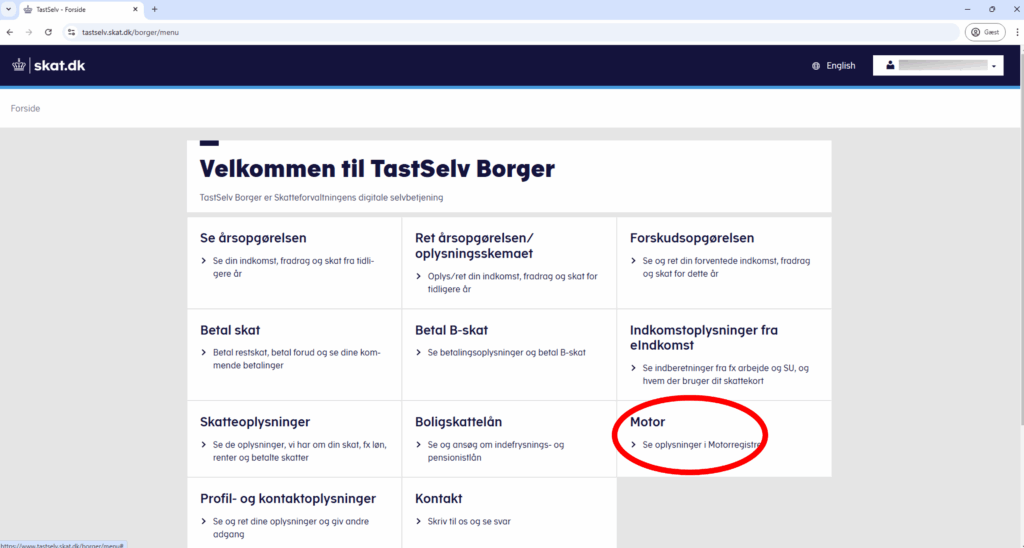
Search for the vehicle under "Køretøjsdetaljer" (Vehicle Details).
Click on the tab labeled "2. Ejer/bruger" (Owner/User). This tab is only visible to the actual owner of the vehicle:
Take a screenshot of the page:
How can Workshops help?
To prevent customers from being deactivated, Service Advisors should:
Verify Consent: Ensure the customer is correctly identified in your workshop system during the installation process.
Inform the Customer: If you suspect a verification check will be triggered, let the customer know they should keep an eye on their app for a message from Connected Cars.
Documentation: Advise the customer that a clear photo of their Registration Certificate (V5C/Logbook) is the fastest way to resolve the check.